



Building a digital marketplace is one of the most lucrative business models in the modern economy. From giants like Amazon and Etsy to hyper-niche platforms connecting local artisans with buyers, the multi-vendor model offers incredible revenue potential. However, the foundation of your success relies heavily on the technology powering your platform. Check out the Best info about CS-Cart Multi-Vendor.
For many entrepreneurs, the default choice is a Software-as-a-Service (SaaS) platform due to its ease of setup. But as your marketplace grows, SaaS platforms often reveal significant drawbacks: escalating monthly fees, rigid customization limits, and a lack of true ownership over your data. This is why forward-thinking founders eventually pivot to self-hosted marketplace software.
If you want absolute control, unlimited customization, and the ability to eliminate recurring platform fees, finding the Best Self-Hosted Marketplace Software with Lifetime License is a game-changer.
In this comprehensive guide, we will dive deep into everything you need to know about selecting, launching, and managing a multi-vendor platform. From evaluating the right scripts for your niche to managing server infrastructure, this guide will equip you with the knowledge to build a scalable, secure, and highly profitable online marketplace.
1. Understanding the Shift: Why Go Self-Hosted?
Before diving into specific platforms, it is crucial to understand the fundamental difference between SaaS solutions and a self-hosted ecommerce platform.
A SaaS marketplace (like Sharetribe Go or Shopify with multi-vendor apps) is rented. You pay a monthly fee, and the provider handles the hosting, maintenance, and updates. While convenient, you are bound by their rules, their server limits, and their pricing tiers.
Self-hosted software, on the other hand, is an asset you own. You purchase the software (often as a one-time license), install it on your own servers, and retain total control over the code, the database, and the user experience.
The Appeal of One-Time Payment Multi-Vendor Platforms
For serious businesses, shifting to one-time payment multi-vendor platforms is a strategic financial move. Instead of paying hundreds or thousands of dollars a month—which cuts directly into your profit margins—you pay a larger upfront fee. Over time, this drastically reduces your overhead.
Furthermore, owning the license gives you the freedom to modify the core code. Whether you need a unique booking system, a custom payment gateway, or a highly specific vendor approval workflow, self-hosted solutions offer the flexibility that SaaS platforms simply cannot match.
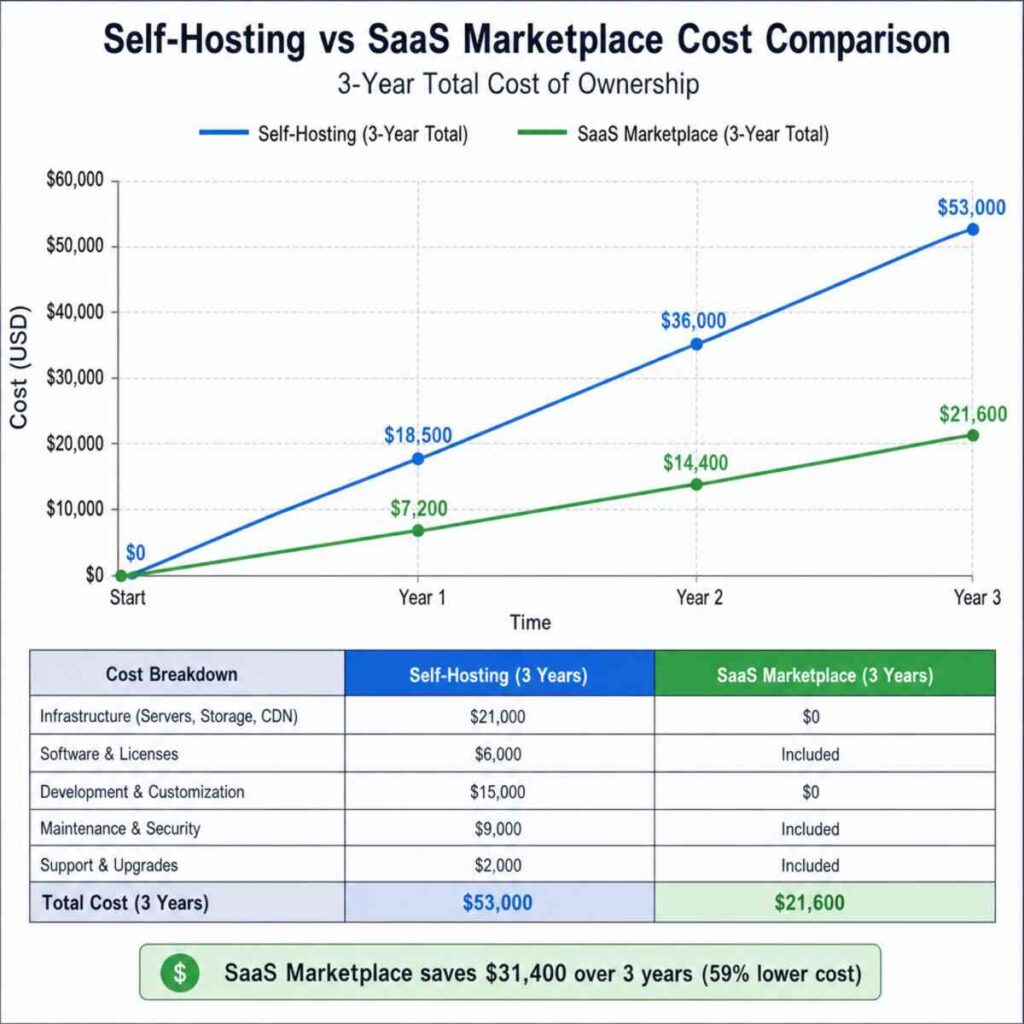
2. Self-Hosting vs SaaS Marketplace Cost Comparison
To truly appreciate the value of a lifetime license, we must conduct a thorough self-hosting vs SaaS marketplace cost comparison. Many founders suffer from “sticker shock” when they see the upfront cost of a premium self-hosted script, but a long-term analysis tells a very different story.
The True Cost of SaaS (Over 3 Years)
When using a SaaS platform, your base subscription might start at $200 per month. However, as your transaction volume, vendor count, and feature requirements grow, you are forced into higher tiers.
- Base Subscription: $300/month ($10,800 over 3 years)
- Premium Apps/Add-ons: $150/month ($5,400 over 3 years)
- Transaction Fees: Many SaaS platforms take a 0.5% to 2% cut of your sales on top of your payment gateway fees. If you process $50,000 a month, a 1% fee costs you $500 monthly ($18,000 over 3 years).
- Total 3-Year Estimated Cost: $34,200+
The Total Cost of Ownership for Self-Hosted Software
Now, let’s look at the total cost of ownership for self-hosted software over the same three-year period.
- Lifetime License Fee: $1,500 (Paid once)
- High-Performance Hosting: $100/month ($3,600 over 3 years)
- Premium Theme & Plugins: $500 (One-time or occasional renewals)
- Routine Maintenance/Developer Support: $1,000/year ($3,000 over 3 years)
- Transaction Fees: $0 (You only pay the standard Stripe/PayPal gateway fees, nothing to the platform).
- Total 3-Year Estimated Cost: $8,600
By choosing a self-hosted platform with a lifetime license, a growing marketplace could easily save over $25,000 in just three years. This is capital that can be reinvested into marketing, vendor acquisition, and customer support.
3. How to Choose Marketplace Script for Niche Markets
Not all marketplace software is created equal. A platform designed for selling physical goods might fail miserably if you are trying to build a service-based booking platform. Knowing how to choose marketplace script for niche applications is vital.
Step 1: Define Your Business Model
- B2C (Business to Consumer): Platforms like Amazon where businesses sell to individuals. You need strong inventory management and bulk upload features.
- B2B (Business to Business): Platforms like Alibaba. You need features like minimum order quantities (MOQs), request for quote (RFQ) systems, and wholesale pricing tiers.
- C2C (Consumer to Consumer): Platforms like Etsy or eBay. You need highly intuitive, simplified vendor dashboards because your sellers are everyday individuals, not tech-savvy corporations.
- Service/Booking: Platforms like Airbnb or Upwork. You require calendar integrations, hourly billing, and location-based search filters.
Step 2: Evaluate the Tech Stack
If you plan to modify the platform heavily, pay attention to the underlying programming language. Many developers prefer PHP marketplace scripts with lifetime updates because PHP powers the vast majority of the web (including WordPress/WooCommerce). Finding affordable developers to customize a PHP-based marketplace is much easier than finding developers for more obscure languages.
Step 3: Check for Niche-Specific Integrations
If your niche involves digital downloads (e.g., a stock photography marketplace), ensure the script supports secure digital file delivery, watermarking, and piracy protection. If you are selling perishable goods, you need hyper-local shipping integrations and delivery time-slot selections.
4. Essential Features for Multi-Vendor Storefronts
When evaluating marketplace software, the feature list can be overwhelming. To avoid getting distracted by flashy gimmicks, focus on the core functionalities that will actually drive your business forward. Here are the essential features for multi-vendor storefronts:
A. Independent Vendor Dashboards
Your sellers are the lifeblood of your marketplace. If it is difficult for them to upload products, track orders, or request payouts, they will leave for a competitor. The software must offer a dedicated, intuitive frontend dashboard for vendors. They should never have to access the backend admin panel of your website.
B. Advanced Commission Management
This is how you make money. Commission management in multi-seller scripts must be highly flexible. Look for platforms that allow you to set:
- Global commission rates (e.g., 10% on all sales).
- Category-specific commissions (e.g., 5% on electronics, 15% on clothing).
- Vendor-specific commissions (e.g., rewarding a top-selling vendor with a lower 8% rate).
- Fixed-fee plus percentage models (e.g., $1.00 + 5% per transaction).
C. Automated Split Payments
Managing payouts manually is a logistical nightmare and a legal liability. Your software must integrate with modern marketplace payment gateways like Stripe Connect or PayPal Marketplace. These gateways automatically split the customer’s payment at the moment of checkout—sending your commission to your account and the vendor’s earnings to theirs—saving you from complex accounting headaches.
D. Product Approval Workflows
To maintain quality control, you need a system that allows administrators to review and approve products before they go live on the storefront. This protects your platform from spam, illegal items, or low-quality listings that could damage your brand reputation.
E. Robust Shipping Management
Shipping in a multi-vendor environment is incredibly complex because a single customer might buy three items from three different vendors in one order. The platform must be able to calculate shipping costs per vendor and generate separate shipping labels and tracking numbers.
5. Software Showdown: CS-Cart vs Dokan Feature Comparison
When exploring open source multi-seller e-commerce scripts and self-hosted platforms, two names frequently dominate the conversation: CS-Cart Multi-Vendor and Dokan Multivendor (built on WordPress/WooCommerce). Let’s dive into a detailed CS-Cart vs Dokan feature comparison to help you decide.
CS-Cart Multi-Vendor (The Standalone Powerhouse)
CS-Cart is a standalone, purpose-built marketplace platform. It is not a plugin added to an existing CMS; it was designed from the ground up specifically for multi-vendor operations.
- Target Audience: Mid-to-large scale marketplaces, enterprise B2B/B2C platforms.
- Performance: Exceptional. Because it doesn’t rely on third-party CMS bloat, its database architecture is highly optimized for complex, multi-vendor queries.
- Vendor Features: Offers an incredibly detailed vendor micro-store feature. Vendors get their own mini-storefronts with unique URLs, specific category structures, and branded banners.
- Pricing Structure: Offers lifetime licenses. While the upfront cost is higher (ranging from $1,450 to over $7,000 depending on the edition), it is a one-time investment.
- Pros: Native high-end features, incredible stability, built-in layout manager, superb administrative controls.
- Cons: Steeper learning curve. Custom development can be more expensive than WordPress.
Dokan Multivendor (The WordPress Champion)
Dokan is a plugin suite that transforms a standard WordPress/WooCommerce website into a fully functional multi-vendor marketplace.
- Target Audience: Startups, small-to-medium marketplaces, and those already familiar with the WordPress ecosystem.
- Performance: Highly dependent on your hosting and the number of other plugins installed. WooCommerce can become database-heavy at scale, requiring expert server optimization.
- Vendor Features: Dokan is famous for its beautiful, easy-to-use frontend vendor dashboard. Sellers can manage everything from products to SEO without ever seeing the WordPress backend.
- Pricing Structure: Offers yearly subscriptions, but frequently provides lifetime license options for its various tiers, making it highly attractive for cost-conscious startups.
- Pros: Massive ecosystem of WordPress plugins, easy to find affordable developers, user-friendly interface, seamless integration with thousands of marketing tools.
- Cons: Relies on a stack of plugins to work optimally (WordPress + WooCommerce + Dokan + Addons), which can lead to plugin conflict issues during updates.
The Verdict: If you are building a massive catalog with thousands of vendors and need enterprise-grade stability, CS-Cart is the superior choice. If you are bootstrapping, love WordPress, and want access to endless third-party marketing plugins, Dokan is your best bet.
6. Managing Server Requirements for High Traffic
A major concern for entrepreneurs moving away from SaaS is taking on the responsibility of hosting. The scalability of self-hosted marketplace software is directly tied to the infrastructure you place it on. A slow marketplace loses customers instantly, and a crashed marketplace loses vendors.
Here is a blueprint for managing server requirements for high traffic in a self-hosted environment:
Move Beyond Shared Hosting
Never host a multi-vendor marketplace on cheap shared hosting (like a $5/month GoDaddy or Bluehost plan). Shared environments lack the CPU and RAM necessary to process complex database queries, multiple vendor logins, and concurrent customer checkouts. You must invest in a Virtual Private Server (VPS), a Dedicated Server, or Cloud Hosting (like AWS, DigitalOcean, or Google Cloud).
The Ideal High-Traffic Tech Stack
To ensure ultimate scalability, your server should be configured with a modern, high-performance stack:
- Web Server: Nginx or LiteSpeed (superior to standard Apache for handling high concurrent traffic).
- Database: MariaDB or MySQL 8.0+. Ensure database caching is enabled.
- Caching Layers: This is non-negotiable. Implement Redis or Memcached to cache database queries. This means when a customer searches for “blue running shoes,” the server remembers the result instead of asking the database to calculate it from scratch every single time.
- Search Engine: For large marketplaces, standard database search is too slow. Integrate Elasticsearch. It provides lightning-fast, typo-tolerant search results, which is a massive conversion booster.
- Content Delivery Network (CDN): Use a service like Cloudflare to serve your product images, CSS, and JavaScript from servers physically closest to your users. This drastically reduces the load on your primary server.
7. Securing a Self-Hosted Marketplace Installation
With control comes responsibility. When you own the platform, you are responsible for the data of both your buyers and your sellers. Securing a self-hosted marketplace installation must be your top priority from day one.
Essential Security Protocols
- Strict SSL Implementation: Ensure your site uses a robust SSL certificate and forces HTTPS on all pages. This encrypts data transferred between the user’s browser and your server.
- Web Application Firewall (WAF): Utilize a WAF (like Cloudflare Pro or Sucuri) to filter out malicious traffic, block SQL injection attempts, and mitigate Distributed Denial of Service (DDoS) attacks before they reach your server.
- Routine Backups: Implement automated, off-site backups. If your server goes down or is compromised, you need daily (or even hourly) database backups stored securely on an external service like Amazon S3.
- Least Privilege Access: Ensure that vendors only have access to their specific data. Regularly audit administrator permissions. Ensure your FTP and SSH access are secured with strong keys and IP whitelisting.
- PCI Compliance: Never store credit card information on your own server. Always use tokenized payment gateways (like Stripe) that handle the sensitive payment data off-site, ensuring your marketplace remains PCI compliant.
8. Designing Your Platform: Customizing Marketplace Templates for Brand Identity
In the e-commerce world, trust is visual. If your marketplace looks outdated or clunky, buyers will hesitate to enter their credit card information. A major benefit of self-hosted solutions is the limitless potential for customizing marketplace templates for brand identity.
Best Practices for Marketplace UX/UI
- The Amazon Standard: Consumers are trained to shop in a certain way. Don’t reinvent the wheel. Ensure your search bar is prominent at the top of the page, use high-quality imagery, and maintain clear, hierarchical category menus.
- Vendor Branding: Allow vendors to customize their micro-stores. Let them upload custom banners, logos, and specific policies. This helps them feel a sense of ownership, which encourages them to promote their store (and by extension, your marketplace) to their own audiences.
- Mobile-First Design: Upwards of 60-70% of e-commerce traffic comes from mobile devices. Your template must be inherently responsive. Buttons must be easily clickable with a thumb, text must be legible without zooming, and the checkout process must be seamless on small screens.
- Trust Signals: Prominently display vendor ratings, product reviews, secure checkout badges, and clear return policies on every product page.
9. Making the Move: Migrating from Shopify to Self-Hosted Marketplace
Many successful marketplaces begin as simple single-vendor Shopify stores. As they attempt to transition into a multi-vendor model, they realize Shopify’s limitations. To achieve multi-vendor functionality on Shopify, you must rely on expensive third-party apps (which often charge monthly fees plus a percentage of sales) and deal with frustrating syncing issues.
If you have hit this ceiling, migrating from Shopify to self-hosted marketplace software is the logical next step. Here is how to handle the transition smoothly:
Phase 1: Data Export and Cleanup
Start by exporting your Shopify data (Products, Customers, Orders) into CSV files. Take this opportunity to clean your data. Remove outdated products, standardize image sizes, and ensure your categories are logically structured for a multi-vendor environment.
Phase 2: Setting Up the New Environment
Install your chosen self-hosted software (e.g., CS-Cart or WooCommerce/Dokan) on a staging server. This is a private environment where you can build and test the new site without affecting your live Shopify store.
Phase 3: Data Import and Vendor Onboarding
Import your cleaned CSV files into the new platform. If you already have partnerships with vendors, invite them to the staging site to set up their profiles, connect their payment accounts (for payouts), and review their product listings.
Phase 4: SEO Preservation (The 301 Redirects)
This is the most critical step. Your Shopify store likely has SEO juice and backlinks pointing to specific URLs (e.g., yourstore.com/products/blue-shirt). Your new self-hosted platform will likely generate a different URL structure (e.g., yourstore.com/item/blue-shirt). You must map out all old URLs and create 301 Redirects to the new URLs. This tells Google that the page has permanently moved, preserving your search engine rankings.
Phase 5: The Flip
Once testing is complete, point your domain’s DNS records away from Shopify and toward your new server. Monitor the site closely for 48 hours, checking error logs and ensuring payment gateways are processing correctly.
10. Best Ways to Monetize Self-Hosted Marketplaces
Building the platform is only half the battle; generating a sustainable profit is the ultimate goal. Without the burden of monthly SaaS fees, your profit margins on a self-hosted platform are naturally higher. However, you must implement the right revenue models.
Here are the best ways to monetize self-hosted marketplaces:
1. Commission on Sales (The Standard Model)
As discussed earlier, taking a percentage of every sale is the most common model. It aligns your success with your vendors’ success. To encourage volume, consider tiered commissions (e.g., 10% for the first $1,000 in sales, dropping to 7% thereafter).
2. Vendor Subscription Fees
Instead of (or in addition to) taking a commission, you can charge vendors a monthly or annual fee to access your platform. This works exceptionally well in B2B niches or when you offer vendors advanced tools (like analytics, CRM integrations, or premium storefront themes).
3. Listing Fees
Similar to eBay, you can charge a flat fee for every product a vendor uploads. This model prevents vendors from flooding your marketplace with low-quality or spammy products, ensuring a higher quality catalog for your buyers.
4. Featured Listings and Advertising
Once your marketplace has significant traffic, visibility becomes highly valuable. Allow vendors to pay a premium to have their products featured on the homepage, at the top of search results, or in your marketplace’s email newsletter. This is essentially building your own internal advertising network (similar to Amazon Sponsored Products) and is highly profitable.
Conclusion: Taking Control of Your Marketplace Future
Building a multi-vendor platform is a complex but highly rewarding endeavor. While the initial convenience of a rented SaaS platform might seem appealing, the long-term limitations, escalating costs, and lack of ownership quickly become apparent as your business scales.
By taking the time to research the Best Self-Hosted Marketplace Software with Lifetime License, you are investing in the true equity of your business. You unlock the ability to customize every pixel of the user experience, control your server infrastructure, and maximize your profit margins by eliminating recurring platform fees.
Whether you choose a dedicated powerhouse like CS-Cart or a flexible, plugin-driven ecosystem like WordPress with Dokan, the key is to align the software with your specific niche requirements. Prioritize seamless vendor experiences, bulletproof security, and a robust server architecture.
When you build on a platform that you truly own, the only limit to your marketplace’s growth is your own ambition.
