


If you have ever written an academic paper for a Brazilian university or an institution that follows Brazilian standards, you already know the unique challenge that awaits you at the end of your research: formatting. You spend months, perhaps years, gathering data, analyzing literature, and writing your thesis. Yet, when the time comes to finalize the document, you find yourself endlessly tweaking margins, checking citation brackets, and deciphering complex reference rules. Look into the Best info about formatador abnt online.
This is where an online ABNT formatting tool becomes an absolute lifesaver. Instead of manually adjusting every single page, automated platforms can instantly align your hard work with the strict guidelines of the Associação Brasileira de Normas Técnicas (ABNT).
Many students, both domestic and international, turn to search engines in desperation, typing phrases like “como formatar TCC nas normas ABNT” (how to format a thesis in ABNT standards) just hours before their deadline. Fortunately, technology has evolved. Today, you do not need to be a formatting guru to produce a perfectly standardized document.
In this comprehensive guide, we will explore everything you need to know about navigating these academic rules. From understanding the core structure of a thesis to discovering the best digital solutions to automate your bibliography, this article is your ultimate roadmap.
Understanding the ABNT Standard: Why Does It Matter?
The Associação Brasileira de Normas Técnicas (ABNT) is the national standardization body in Brazil. While they regulate everything from construction materials to software engineering, in the academic world, ABNT is synonymous with the strict formatting guidelines applied to essays, monographs, dissertations, and theses.
But why do universities insist on such rigid rules? The answer lies in scientific communication. Standardization ensures that academic works are universally readable, easily scannable, and systematically archived. When everyone follows the same structure, researchers can effortlessly locate specific data, verify sources, and reproduce studies.
Decoding the NBR 14724
The cornerstone of academic formatting in Brazil is NBR 14724. If you are looking for the exact regras da NBR 14724 para trabalhos acadêmicos (NBR 14724 rules for academic papers), you must understand that this norm dictates the fundamental presentation of academic documents.
NBR 14724 establishes the sequence in which your document must flow. It categorizes the paper into three distinct sections: pre-textual, textual, and post-textual elements. Attempting to organize this manually can lead to severe structural errors, which is exactly why adopting a smart online abnt formatting tool is highly recommended.
The Anatomy of an Academic Paper
To successfully format your document, you need a reliable guia de elementos pré-textuais e pós-textuais (guide to pre-textual and post-textual elements). Understanding this anatomy is crucial before you feed your text into any automated system.
Let’s break down the estrutura obrigatória de teses e dissertações (mandatory structure for theses and dissertations).
1. Pre-Textual Elements (Elementos Pré-Textuais)
These pages precede the core content of your research. They set the stage, provide metadata, and formally introduce the work. Notably, these pages are usually counted but not paginated (the page numbers do not appear on the page until the text begins).
- Cover (Capa): Mandatory. Contains the institution’s name, the author’s name, the title, the city, and the year.
- Title Page (Folha de Rosto): Mandatory. Similar to the cover but includes a brief descriptive note about the nature of the work (e.g., “Thesis submitted to the Department of Economics…”).
- Approval Sheet (Folha de Aprovação): Mandatory for theses and dissertations. Contains the signatures of the examination board.
- Dedication & Acknowledgments (Dedicatória e Agradecimentos): Optional but highly recommended.
- Epigraph (Epígrafe): Optional. A relevant quote that sets the tone.
- Abstract in the Vernacular (Resumo): Mandatory. A concise summary of the paper in Portuguese, followed by keywords.
- Foreign Language Abstract (Abstract): Mandatory. The English (or other foreign language) version of your summary.
- Lists (Figures, Tables, Abbreviations): Optional, but necessary if you use many visual aids.
- Table of Contents (Sumário): Mandatory. The roadmap of your document, detailing chapters and subchapters with exact page numbers.
2. Textual Elements (Elementos Textuais)
This is the heart of your research. It is generally divided into three main parts:
- Introduction: Introduces the theme, research problem, objectives, and justification.
- Development: The longest section. It includes the literature review, methodology, results, and discussion. This section heavily relies on citations.
- Conclusion (or Final Considerations): Summarizes the findings and answers the research question proposed in the introduction.
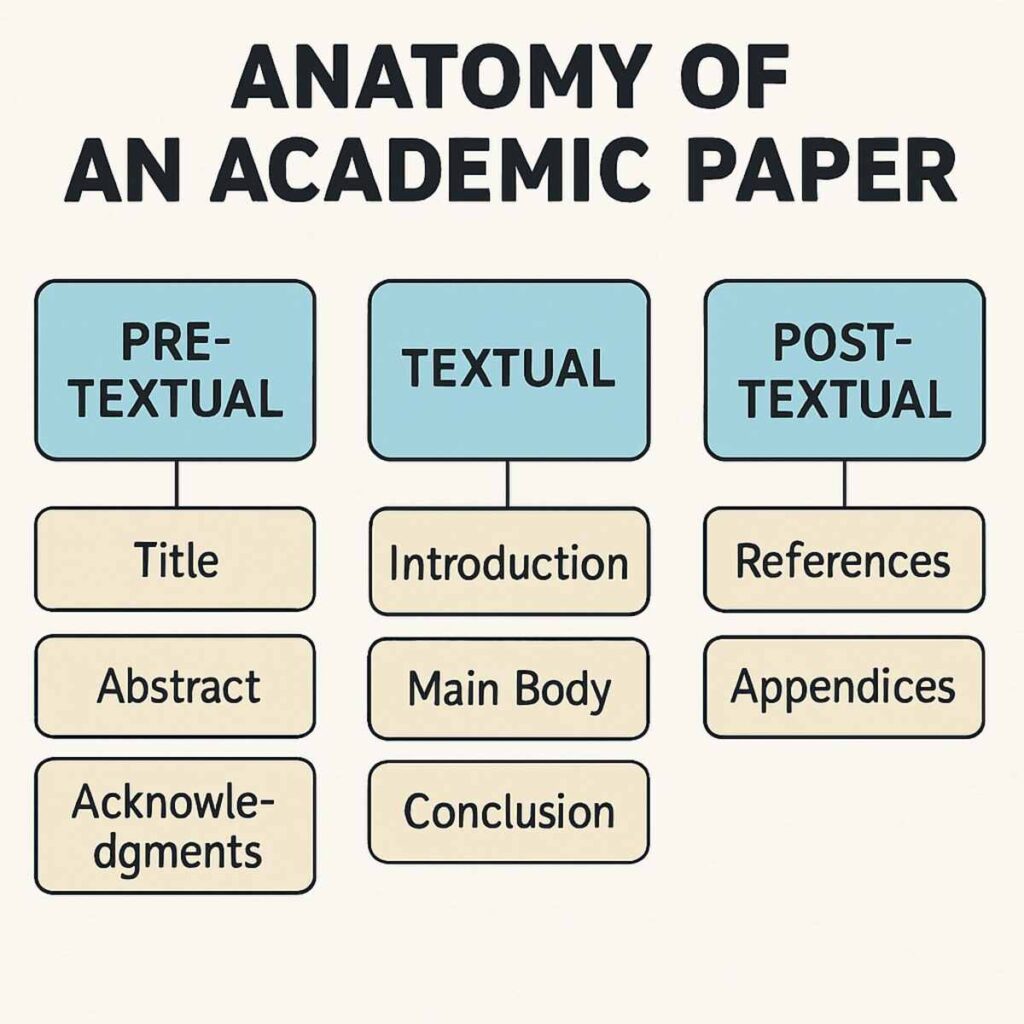
3. Post-Textual Elements (Elementos Pós-Textuais)
These elements provide supporting information and credit the sources used in the research.
- References (Referências): Mandatory. The exhaustive list of all cited works.
- Glossary (Glossário): Optional. A list of technical terms.
- Appendices (Apêndices): Optional. Materials created by the author to support the text (e.g., a questionnaire).
- Annexes (Anexos): Optional. Materials created by others to support the text (e.g., a copy of a historical law).
Managing these distinct sections can be overwhelming. A robust online bibliography tool can help you structure the post-textual elements flawlessly, ensuring you don’t miss a single comma or italicized title.
Perfecting Page Setup: Margins, Fonts, and Spacing
Before writing a single word, you must ensure your canvas is prepared correctly. If you need to know how to configurar margens e espaçamento segundo ABNT (configure margins and spacing according to ABNT), here is the golden rule:
Margins
- Top and Left margins: 3.0 cm
- Bottom and Right margins: 2.0 cm
Why this specific setup? The larger left margin accommodates the physical binding of the printed document, ensuring that no text is lost in the spine.
Font and Typography
- Font type: Arial or Times New Roman. (You must choose one and stick with it throughout the entire document).
- Font size: Size 12 for the main text. Size 10 is reserved for direct long citations (more than three lines), footnotes, image captions, and page numbers.
- Color: Always black. (Colours are only permitted in graphs or figures where strictly necessary.
Spacing and Alignment
- Line spacing: 1.5 cm for the main text.
- Exceptions: Single spacing (1.0 cm) must be used for long direct citations, footnotes, references at the end of the document, and image captions.
- Alignment: Justified (text aligned evenly along both the left and right margins).
- Paragraph Indentation: The first line of every paragraph should be indented by 1.25 cm.
Trying to manually apply these rules retroactively to a 100-page document is a nightmare. This is why learning to corrigir formatação de artigo científico automaticamente (correct scientific article formatting automatically) using dedicated software is the smartest move a modern researcher can make.
Mastering Citations: The NBR 10520 Standard
If there is one area where students lose the most points, it is in-text citations. Citing sources incorrectly not only lowers your grade but can also lead to accusations of academic dishonesty. Knowing exactly how to do direct and indirect citations correctly is paramount.
ABNT NBR 10520 governs how we attribute ideas to their original authors. Let’s look at the three main types of citations.
1. Direct Short Citation (Citação Direta Curta)
A direct short citation is an exact, word-for-word copy of the original text that is up to three lines long.
- Rule: It must be enclosed in double quotation marks (” “) and seamlessly integrated into your standard paragraph. You must include the author’s last name, the year of publication, and the specific page number.
- Example (Author in the text): According to Silva (2021, p. 45), “the economic impact of the new policy was immediate.”
- Example (Author at the end): The results showed that “the economic impact of the new policy was immediate” (SILVA, 2021, p. 45).
2. Direct Long Citation (Citação Direta Longa)
When you copy text word-for-word that exceeds three lines, the rules change drastically.
- Rule: Quotation marks are removed. The text must be placed in its own separate paragraph. This entire paragraph must be indented 4.0 cm from the left margin. The font size is reduced to 10 pt, and the line spacing is changed to single (1.0).
- Example:
3. Indirect Citation (Citação Indireta / Paráfrase)
An indirect citation is when you summarize or paraphrase another author’s idea using your own words.
- Rule: No quotation marks are used. You must cite the author and the year. Mentioning the page number is optional but recommended by some institutions.
- Example: Silva (2021) argues that recent policy changes have had swift financial consequences for the local market.
The Importance of Automated Citations
Navigating the nuances of “et al.” for multiple authors, citing corporate bodies, or referencing an author who cites another author (the dreaded “apud”) is incredibly tedious. Using an online citation tool guarantees that your brackets, capitalizations, and punctuation marks are flawless. Furthermore, relying on an automated system is the safest way to evitar plágio com citações automáticas (avoid plagiarism with automatic citations), ensuring every single borrowed idea is properly credited.
The Ultimate Solution: The Online ABNT Formatting Tool
We have established that formatting manually is a grueling, error-prone task. The modern alternative is the online ABNT formatting tool. These web-based platforms are designed to take your raw text, metadata, and references and instantly compile them into a perfectly formatted PDF or Word document that complies with all ABNT regulations.
What is an Online ABNT Formatting Tool?
Think of it as a smart word processor tailored exclusively for academic standards. Instead of opening a blank document and setting up margins, you enter your content into pre-defined, structured fields. The software acts as a specialized gerador automático de citações e referências (automatic generator of citations and references) combined with a structural template.
Key Benefits of Using Dedicated Software
- Time Efficiency: What usually takes days of tweaking can be accomplished in minutes.
- Error Reduction: Algorithms do not forget to italicize a book title or misplace a comma in a reference list.
- Automatic Updates: ABNT rules occasionally update. An online bibliography tool updates its systems in real-time, ensuring you are always compliant with the latest version.
- Cloud Storage: Your thesis is safely backed up in the cloud, preventing catastrophic data loss.
If you are a student mapping out a passo a passo para padronização de trabalhos acadêmicos (step-by-step for standardizing academic papers), integrating an online tool should be step number one.
Step-by-Step: Formatting Your Document Online
Transitioning from traditional word processors to an automated platform is intuitive. Here is a general step-by-step guide on how to utilize an online abnt formatting tool effectively.
Step 1: Choose Your Platform
There are numerous tools available, both paid and free. Mais adiante, discutiremos alternativas gratuitas para a formatação de monografias (free alternatives for monograph formatting). For now, select a reliable platform and create an account.
Step 2: Input Your Metadata
When you start a new project, the tool will ask for your pre-textual data. You will fill out a form with:
- Your full name
- The title and subtitle of your work
- Your university, faculty, and course
- Your advisor’s name
- The city and year
The software uses this data to instantly generate your Cover, Title Page, and Approval Sheet.
Step 3: Write or Paste Your Text
You can write directly into the platform’s editor, which usually locks the font and spacing to ABNT standards by default. If you have already written your text in Word or Google Docs, you can paste it into the respective chapter sections (Introduction, Methodology, etc.).
Step 4: Add Your Sources to the Library
This is where the magic happens. Navigate to the tool’s reference manager. Whenever you use a book, website, or journal, add it to your library by inputting the ISBN, DOI, or manually filling out the author, title, publisher, and year.
Step 5: Insert Citations as You Go
While editing your text, use the tool’s “Insert Citation” feature. Select the source from your library, input the page number, and specify if it is a direct or indirect quote. The software will format the in-text citation correctly and automatically add the full reference to the post-textual section.
Step 6: Export Your Final Document
Once you have reviewed your work, you can usually export it as a Word (.docx) or PDF file. This is crucial for students who need to exportar referências no formato ABNT (export references in ABNT format) directly to their final submission file.
Word versus Softwares de Padronização Acadêmica
A common debate among students is Word versus softwares de padronização acadêmica (Word versus academic standardization software). Should you tough it out in Microsoft Word, or migrate to a specialized platform?
Microsoft Word: The Traditional Route
Pros:
- Universally accessible and familiar.
- Highly customizable for complex tables and unique graphic layouts.
- Great offline capabilities.
Cons:
- Requires deep knowledge of NBR standards.
- Manual formatting is highly susceptible to human error.
- The built-in reference manager is notoriously clunky and often fails to perfectly align with strict Brazilian ABNT nuances.
Academic Formatting Software (Online Tools)
Pros:
- Zero learning curve regarding ABNT rules; the software handles it.
- Automated index generation (Table of contents, figure lists).
- Flawless reference lists sorted alphabetically automatically.
- Acts as a powerful software para organizar bibliografia de pesquisa (software to organize research bibliography).
Cons:
- Requires an internet connection for cloud-based tools.
- Some advanced features may be hidden behind paywalls.
- Less flexibility if your institution has highly specific “house rules” that deviate slightly from standard ABNT.
The Verdict: While Word is a fantastic text editor, it is a poor formatting engine for strict academic rules. Using an online ABNT formatting tool saves a tremendous amount of time and mental energy.
Exploring the Best Tools: Which One Should You Use?
Students constantly ask, “qual o melhor gerador de referências bibliográficas?” (what is the best bibliographic reference generator?). The answer depends on your specific needs, budget, and technical comfort level. Here is an overview of the landscape.
1. FastFormat
FastFormat is arguably one of the most popular platforms in Brazil. It operates as a complete online abnt formatting tool, handling everything from the cover page to the final references. You write directly in their browser-based editor, and it compiles your document in real-time. It is excellent for students writing their entire TCC (Trabalho de Conclusão de Curso) from scratch.
2. Mettzer
Mettzer is another powerhouse in the academic formatting space. It is renowned for its user-friendly interface and robust collaborative features, allowing advisors to leave comments directly on the platform. It functions seamlessly as an online bibliography tool and citation manager.
3. Menthor (formerly MORE)
If you only need a gerador automático de citações e referências and prefer to do the text formatting in Word, tools based on the MORE (Mecanismo Online para Referências) system, developed by UFSC (Universidade Federal de Santa Catarina), are incredible. They are often completely free and incredibly accurate for generating individual reference entries.
4. Mendeley and Zotero
While not strictly ABNT text formatters, Mendeley and Zotero are the ultimate software for organising bibliographic references. They are free reference managers that integrate with Word via plugins. You can download the ABNT citation style from the app, and it will automatically format your in-text citations and bibliography as you type in Word. Estas son las mejores alternativas gratuitas para la formatación de monografías regarding bibliography management.
Navigating the Complexities of References (Referências)
Even with an online citation tool, it helps to understand how ABNT structures the final reference list. NBR 6023 is the standard that dictates references. Let’s look at how the software automatically formats different types of sources.
Books (Livros)
Format: LAST NAME, First Name. Title in bold or italics: subtitle (if any). Edition. City of publication: Publisher, Year. Example generated by tool: SILVA, João. The Economics of Tomorrow: A Global Perspective. 2. ed. São Paulo: Atlas, 2020.
Academic Journal Articles (Artigos de Periódicos)
Format: LAST NAME, First Name. Title of the article. Title of the Journal in bold or italics, City, volume, number, page range, month. Year. Example generated by tool: SOUZA, Maria. Inflation metrics in emerging markets. Revista de Economia Brasileira, Rio de Janeiro, v. 15, n. 3, p. 112-130, set. 2021.
Websites (Documentos Eletrônicos)
Format: LAST NAME, First Name (or ORGANIZATION NAME). Title of the page/article. Site Name, Year. Available at:. Accessed on: Day Month Year. Example generated by tool: INSTITUTO BRASILEIRO DE GEOGRAFIA E ESTATÍSTICA (IBGE). População estimada. IBGE, 2023.
By using an online ABNT formatting tool, you never have to memorize whether the journal title or the article title is the one that gets italicized—the algorithm does it for you instantly.
Common Pitfalls and How to Avoid Them
Even with automated software, human error can sneak in during data entry. Keep an eye out for these common mistakes:
1. Inconsistent Author Names
If you enter “Silva, J.” for one citation and “Silva, João” for another, the software might treat them as two different authors. Always be consistent with how you input metadata into your online bibliography tool.
2. Missing Metadata
An automated tool is only as good as the data you feed it. If you forget to input the city of publication or the publisher for a book, the software will leave a blank space or generate an incomplete reference. Always double-check your source’s copyright page.
3. Overlooking “et al.”
When a work has four or more authors, ABNT allows the use of the primary author’s name followed by “et al.” (and others). While good software handles this automatically, you must ensure you actually input all authors into the system initially so the software can make the correct algorithmic decision.
4. Plagiarism by Poor Paraphrasing
Como mencionado anteriormente, uma ferramenta de citação online ajuda a evitar plágio com citações automáticas. However, if you write an indirect citation but your paraphrase is too close to the original text, it can still trigger plagiarism checkers. Always ensure your voice is distinct when summarizing.
Final Review: The Checklist for Success
Before you hit export on your chosen platform, run through this final checklist to ensure your document is flawless.
- Check the Preliminaries: Are the cover, title page, and approval sheet accurately reflecting your current title and advisor’s name?
- Update the Table of Contents: If you used an online tool, this is usually automatic. If you used Word, right-click the table and hit “Update Field > Update entire table” to ensure page numbers align.
- Verify Margins: Do a quick visual scan to ensure the 3 cm/2 cm rule is applied consistently.
- Review Long Citations: Skim the document for blocks of indented text. Ensure they are size 10 font, single-spaced, and properly cited with page numbers.
- Cross-Reference the Bibliography: Pick three random citations from your text and physically look for them in the final reference list. If they are there and formatted correctly, your tool has done its job.
The Future of Academic Writing Technologies
As artificial intelligence continues to evolve, the landscape of academic formatting is shifting. We are already seeing tools that not only format your text but also suggest relevant literature based on your keywords. In the future, a software para organizar bibliografia de pesquisa might automatically cross-reference your claims against global databases to verify factual accuracy.
However, the core requirement of standardization will remain. Institutions will always need a unified way to digest and archive research. By mastering these digital tools today, you are future-proofing your academic and professional career.
Conclusion: Embrace Automation, Focus on Research
Writing an academic thesis is a monumental achievement. It requires critical thinking, deep analysis, and a commitment to discovering new knowledge. Your time and intellectual energy should be spent on the quality of your arguments, not on adjusting paragraph indentations.
By utilizing an online ABNT formatting tool, you empower yourself to work smarter. Whether you are figuring out how to format TCC according to the ABNT norms for the first time or you are a seasoned researcher looking to streamline your workflow, these digital platforms are indispensable. They guarantee compliance with NBR 14724, manage your complex citations via NBR 10520, and automatically compile a flawless reference list.
Stop fighting with your word processor. Embrace the power of an online citation tool, structure your document with confidence, and submit your research knowing that the formatting is absolutely perfect.
